


Start with one company heading
List the company once with your full employment dates, then put each title beneath it with the dates you held it. For clear, consecutive promotions, this shows progression while keeping the continuous employment record visible.
For example:
Northstar Analytics, London | May 2019-Present Associate Data Scientist | Jan 2024-Present Senior Data Analyst | Jul 2022-Jan 2024 Data Analyst | May 2019-Jul 2022
WPI's resume guidance recommends this structure for similar jobs in the same department: list the employer with inclusive dates, then give each title its own dated line.
If a promotion moved you into a different function or department, keep the one company heading but give each title its own line and role-specific description. WPI recommends that treatment when jobs or departments at the same employer differ.
Keep every title and its dates visible. You are showing one employer relationship and the title changes within it.
When promoted roles belong together
Use a shared bullet section only when the promotion changed your level more than your work. The useful test is simple: if separate descriptions would make you repeat the same reporting, analysis or stakeholder work, group that content. WPI guidance uses this format for similar roles in the same department.
For example, Data Analyst, Senior Data Analyst and Analytics Lead can sit above one set of bullets if the work remained centred on reporting and analysis. Add a separate bullet only for work that genuinely changed with the later title, such as setting team priorities. Your dated title lines still carry the promotion story.
| Company | Titles | Shared content |
|---|---|---|
| Northstar Retail May 2021 to present | Analytics Lead, Jan 2025 to present
Senior Data Analyst, Jul 2023 to Dec 2024 Data Analyst, May 2021 to Jun 2023 | One bullet section for reporting and analysis work that continued across the promotions. |
When a promotion needs its own space
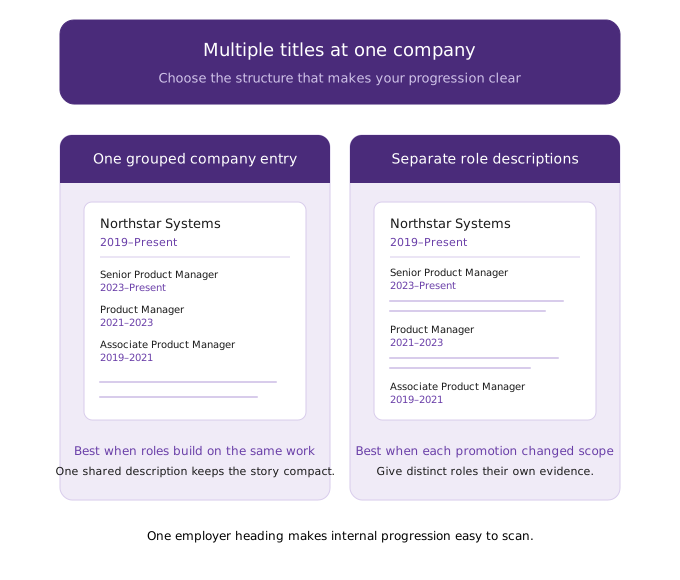
Keep the titles under one company heading, but give each role its own description when the work changed. A move from reporting into product analytics, for example, needs more than a new date beside the same bullets.
WPI recommends separate title lines with role-specific descriptions beneath the same employer when roles or departments differ. For example, an applicant targeting associate data scientist roles might use two title lines:
| Title | Dates | What belongs beneath it |
|---|---|---|
| Associate Data Scientist, Customer Analytics | 2024–Present | Modelling, experimentation and work closest to the target role |
| Data Analyst, Finance | 2021–2024 | Earlier reporting and finance analysis work |
Put the company and location above both title lines. Give each title its own dates and bullets when the roles differ. That keeps the employer relationship clear while giving the reader enough space to see what changed.
Do not split a short promotion solely because the title changed. If you spent six months as an Analyst before becoming Senior Analyst in the same team, with mostly overlapping work, group the titles.
Use separate descriptions when a few lines need to show a department change, different work, substantial tenure, or closer relevance to your target role. Otherwise, keep the company entry compact and make the progression clear in the title dates.
Make continuous employment visible at a glance
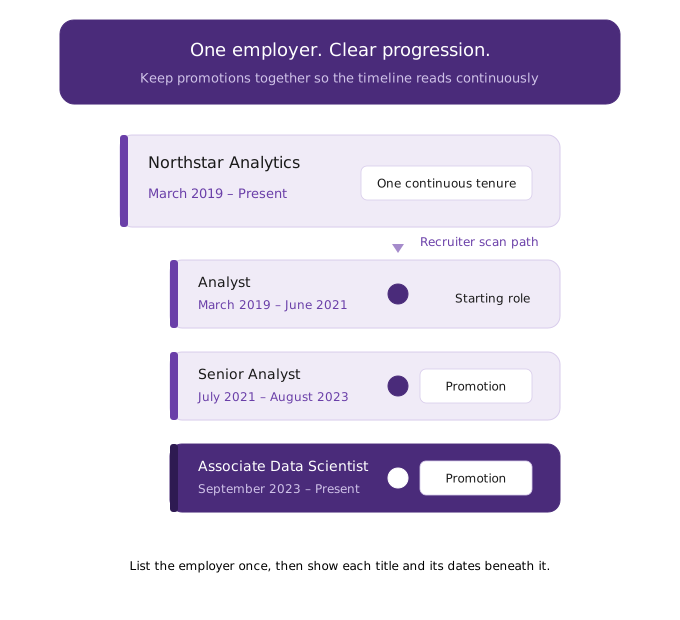
Put the company name, location and full employment span on one line, then stack each title beneath it with its own month-year dates. A recruiter should be able to see "one employer, three promotions" before reading a bullet.
Northstar Analytics | Manchester, UK | Jan 2020 - Present
  Associate Data Scientist | Jul 2024 - Present
  Data Analyst | Mar 2022 - Jun 2024
  Junior Data Analyst | Jan 2020 - Feb 2022.
Keep the employer, titles, location and dates close together in one consistent text pattern. Fields split across floating boxes or detached columns can be harder for an applicant tracking system to classify. Use month-year dates, such as "Jan 2023 - Present", for every title.
For clear consecutive promotions, use one company header with separate title-and-date lines. It makes the progression and continuous employment record visible without repeating the employer for each role. This is a formatting choice, not a guarantee of how every recruiter or applicant tracking system will interpret the entry.
ATS needs readable employer and title fields
Keep the employer, title, location and dates together in ordinary text. Detached fields or different columns can make classification harder.
Use month-year dates and give every promoted title its own readable line, even under one company heading:
Northstar Distribution | Chicago, IL | Jan 2019 - Present
Operations Manager | Mar 2022 - Present
Operations Supervisor | Jun 2020 - Feb 2022
Operations Coordinator | Jan 2019 - May 2020
This shows continuous employment while keeping each title identifiable. One employer with separate titles and date ranges works when the hierarchy stays linear. Do not nest promotions inside a paragraph.
Greenhouse's Harvest API represents candidate employment as one row per employer and title, with separate free-text company and title fields. That does not prescribe a resume layout or describe every ATS. It supports a practical rule: make each title easy to associate with its employer.
If you use a two-column template, check the exported PDF. Keep each title close to the company name and its own dates.
Overlapping responsibilities do not need three copies
Compare the two versions below. The first makes a three-year run at one employer look longer than it was because the same reporting work appears three times. The second keeps the promotion history visible and gives the reader the new information once.
The shared bullets cover work that continued across the three titles. The final bullet earns its separate space because it records a change in scope. This format gives a recruiter the timeline, the continuing contribution and the promotion signal without asking them to compare near-identical descriptions.
Use distinct descriptions when a role involved materially different work, lasted long enough to carry its own record, or contains experience that is closer to the role you want next. For example, an earlier reporting role and a later associate data scientist role may need separate content if the later job added modelling or experimentation. Keep both titles under the same company heading and retain the dates for each one.
Before you submit, scan the bullets beneath your internal titles. If two bullets describe the same work, combine them. If a later title changed your responsibility, add the specific change rather than rewriting the whole job.
Check your own company entry
Read the entry as a recruiter would: can they see one employer, continuous dates and every title without reconstructing the timeline?
- Consecutive promotions with similar work: use one company heading, inclusive employment dates, and dated titles beneath it.
- A substantially different, long-held, or target-relevant role: give it its own description under that company heading.
- A return after another employer: repeat the company as separate reverse-chronological entries so the timeline stays accurate.
- Repeated responsibilities: keep every title and date, but write shared work once.
Paste your company entry into cvlift.ai and use its AI suggestions to make the wording more concise or improve its style, accepting only changes that keep your dates and titles exact.