


The Problem: Squeezing Content
At some point during every CV update, the same crisis hits: it's too long, and you have no idea what to cut.
So you do what most people do. You squeeze the margins a little. Tighten the line spacing. Drop the font size half a point. Before long, the whole thing looks like a rental agreement, and you've still got the same problem underneath it.
Length isn't actually the problem. The problem is what's in there. And the fix isn't to shrink the container — it's to be more ruthless about what earns a spot in the first place.
The One Page vs Two Page Debate, Settled
The honest answer is: it depends on how much relevant experience you have. Not how much experience you have total — how much of it is actually relevant to where you're applying next.
| One page works well when… | Two pages are fine when… |
|---|---|
| You have under 10 years of experience | You have 10+ years of relevant experience |
| You're earlier in your career or recently graduated | Your field expects comprehensive documentation (academia, law, some technical roles) |
| Your recent roles are the only ones that matter | You've had multiple significant roles that all tell a coherent story |
| You're changing industries and older roles don't carry over | One page means cutting things that genuinely matter |
The data backs this up. A study by career research placed 482 recruiters and hiring managers through a simulated hiring process with over 7,700 real CVs. Recruiters were 2.3 times more likely to select two-page CVs over one-page ones, and they rated two-pagers 21% higher on quality.
Crucially, all the two-page CVs in the study were well-written and relevant. Padding a CV to two pages with filler doesn't produce the same effect — it just gives recruiters more to skim past.
A few things that don't factor into this decision at all: what you've heard from your mate who works in HR, what a CV template told you, or a vague sense that two pages 'looks more impressive.' It doesn't. A tight one-pager from someone with seven years of experience will beat a bloated two-pager every time.
Three pages or more, by the way, is almost never the answer. If you're there, the editing advice below is especially for you.

White Space Is Not the Enemy
This is the most common mistake people make when editing for length: they sacrifice readability to squeeze in content.
Margins get crushed to 0.4 inches. Line spacing drops to 0.9. The CV technically fits on one page. It also looks like it's trying to escape the document.
White space isn't wasted space. It's what makes a CV easy to read at a glance, which matters enormously when a recruiter is giving it six seconds of attention. A CV with breathing room looks more professional than a dense one, even if the dense one technically contains more information.
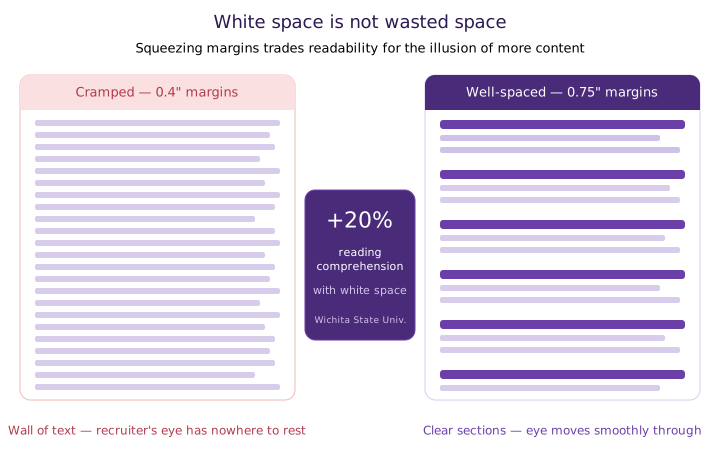
Research from Wichita State University found that adding white space around text blocks improves reading comprehension by up to 20%. On a CV, that translates directly: the recruiter finds your best information faster, with less effort.
TheLadders' eye-tracking study flagged this from the other direction too — the worst-performing CVs in their research shared one consistent trait: cluttered layouts with little white space, multiple columns, and long sentences. The content might have been fine. The layout made it invisible.
If something has to give, it should be content, not formatting. Cut a weak bullet before you cut a margin.
What to Cut First: A Prioritisation Framework
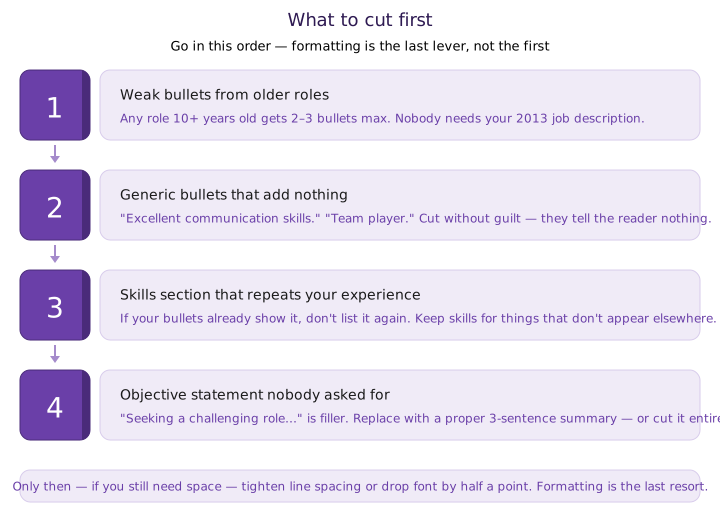
When you need to lose some length, go in this order:
1. Weak bullets from older roles
Any role that's more than 10 years old should have two or three bullets at most, ideally just the standout achievements. Nobody needs a detailed breakdown of what you did in 2013.
2. Generic bullets that add nothing
'Excellent communication skills.' 'Strong attention to detail.' 'Team player.' These take up space and tell the reader nothing they couldn't assume. Cut them without guilt.
3. A long skills section that repeats your experience
If your bullets already demonstrate that you can use Excel or manage a budget, you don't need to list those in a separate skills section as well. Keep skills for things that genuinely don't show up elsewhere — software, languages, certifications.
4. An objective statement nobody asked for
'Seeking a challenging role where I can utilize my skills...' This was standard 15 years ago. It reads as filler now. Replace it with a proper summary, or cut it entirely.
How to Write a Summary That Actually Does Something
A professional summary is worth having, but only if it's doing real work. Most aren't. Most are a vague paragraph that could apply to anyone with a similar job title. A summary that works has three things in it:
Three sentences. Specific. Tailored to the role you're applying for. That's it.
One note: objective statements (the 'seeking a role where...' version) still have a narrow use case — if you're entering the workforce for the first time, making a significant career change, or applying somewhere your intent genuinely isn't obvious. In those cases, a brief objective can frame the application. For everyone else: summary, not objective.
The Section Most People Are Missing: Projects
Here's a section worth adding if you don't already have it.
A dedicated projects section lets you include meaningful work that doesn't fit neatly into a standard job history — freelance work, side projects, significant work done outside your main role, pro bono consulting. It's particularly useful if:
- You're changing careers and your formal experience doesn't quite tell the right story
- You're a recent graduate with relevant projects but limited employment history
- You've done significant work that your job title wouldn't suggest
Keep it tight — two or three entries, same format as your work history: what it was, what you did, what the outcome was. It's not a portfolio dump. It's a curated highlight reel of work that adds context the rest of your CV can't.
The Editing Pass That Actually Works
Once you know what to cut, here's a practical approach to the edit itself:
1. Print it out or view it at 100% zoom
You'll see problems you can't see when you're zoomed in and editing. Does it feel cramped? Is anything obviously taking up space without earning it?
2. For each bullet, ask: would a hiring manager care?
Not 'is this true' — 'would someone reading 200 CVs today find this useful or impressive?' If the honest answer is no, cut it.
3. Give older roles less space
Your most recent role should have the most detail. Roles from 8+ years ago get a title, dates, company, and maybe two lines. The older it is, the less space it needs.
4. Only then, adjust formatting
After content is trimmed, if you still need a little more space, tighten line spacing slightly or reduce font by half a point. Formatting is the last lever, not the first.
The Right Length Is the One That Earns Its Space
One page or two is the wrong question. The right question is: does every line on this CV do something? Does it tell the reader something they couldn't guess, something that makes them want to keep reading?
If you're not sure what's worth keeping and what's filler, cvlift.ai can help you work through it — flagging weak bullets, suggesting tighter phrasing, and giving you a clearer sense of what's actually landing. Sometimes a second pair of eyes (even an AI one) is all it takes to see what you've stopped seeing.