

The Black Hole
You spent three hours tweaking a template on Canva. The colors match, the two-column layout looks modern, and you even added little progress bars for your language skills. You download the PDF, upload it to the company portal, and wait.
A bit later, you get the automated "Unfortunately, we have decided to move forward with other candidates" email.
Not because something is wrong with your professional experience, but because nobody reads your resume. A human never even saw it, and, probably, never will.
If your job hunt feels like throwing applications into a black hole, you are likely failing the first technical hurdle: the Applicant Tracking System (ATS).
Let's face the truth about how these systems read your CV, the layout mistakes that scramble your data, and how to format a resume that actually survives the screening.
How the Machine Actually Reads Your CV (The Technical Reality)
Applicant Tracking Systems (like Workday, Greenhouse, or Taleo) represent a CRM with text parsers. They do not care about your aesthetic choices. Their only job is to extract raw text, categorize it into database fields (Experience, Education, Skills), and score it against the job description. That's it.
Parsers read sequentially: strictly left-to-right, top-to-bottom. When you use a complex layout, you force a linear machine to read a non-linear document. The result is a complete semantic collapse.
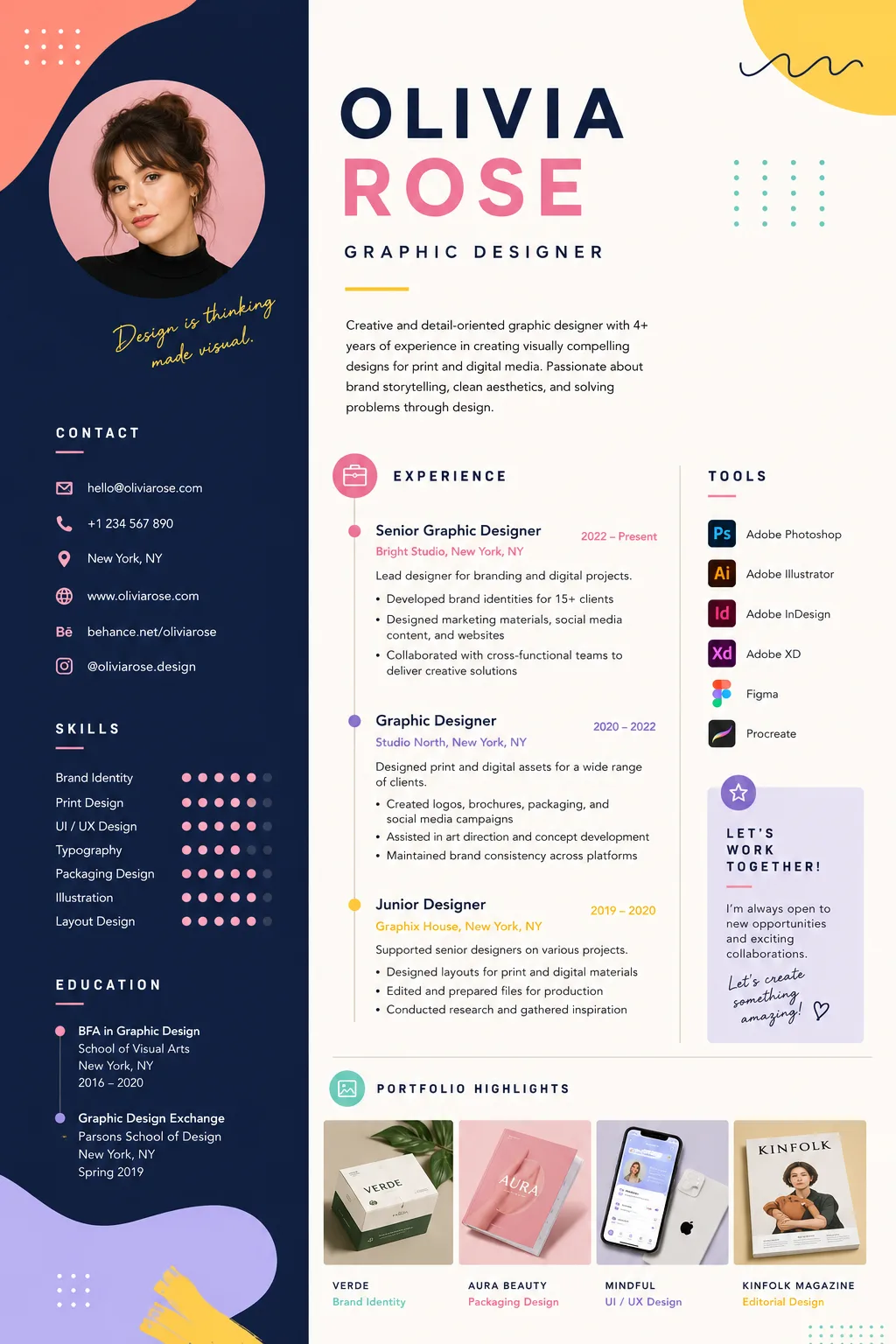
This is what you upload, feeling proud of the design. But to an ATS filter, it's just a scrambled mess of data it can't match to the job description. The machine doesn't care about your aesthetics or the effort you put in. And neither will the recruiter, because the system only shortlists the CVs it can actually read.
Your contact info is merged with your job title. Your skills are mashed into your job duties. Your portfolio is left unparsed, because the system can't categorize this mess and recognize images. As a result, your CV goes unnoticed, and you receive an automated rejection.
This is definitely not the outcome you wanted.
Illusion of GDPR protection
"Wait a minute," you might ask, "aren't recruiters legally obligated to manually review my profile under GDPR?"
In theory, yes. Article 22 of the GDPR restricts purely automated decision-making that has a significant impact on your life (like employment). But in the real world of tech and B2B hiring, corporations easily bypass this using two massive loopholes.
First: explicit consent. When you check that mandatory "I agree to the privacy policy" box to submit your application, you are legally consenting to automated data parsing and scoring.
Second: The ATS doesn't officially press the reject button. Instead, it gets scrambled data from your great, well-designed resume and assigns you a "Match Score" of 3%. The human recruiter then logs into the dashboard, sets a filter to only display candidates with a score above 80%, and mass-rejects the rest with a single click.
Legally, a human made the final decision. In reality, the machine killed your chances because it didn't parse your PDF.
The Layout Mistakes That Break ATS Parsers
Most "creative" CV templates sold online are digital poison for your application. If your resume contains any of the following, you are actively sabotaging your chances:
- Multi-Column Layouts: As shown above, parsers struggle to separate columns. A single-column design is non-negotiable. We covered the parsing accuracy gap between layouts in our deeper piece on how ATS filters out strong candidates.
- Text Boxes and Floating Elements: ATS software extracts native text. If your text is trapped inside a drawn shape or floating text box, the parser often skips it entirely, treating it as an image.
- Complex Tables: Tables are a parsing nightmare. If you use a table to list your core competencies, the ATS will likely read the columns out of order or fail to extract the text altogether.
- Headers and Footers: Many older ATS systems ignore anything placed in the document's header or footer. If your email and phone number are up there, the system registers you as a candidate with no contact information.
- Graphics and "Skill Sliders": A visual slider showing you are "4 out of 5 stars" in Python means absolutely nothing to a machine. It only understands text keywords. Write "Python (Advanced)".
ATS-Friendly Templates: What to Avoid vs. What to Look For
Forget what design influencers tell you. In the B2B and tech hiring world, boring is effective.
What to completely avoid:
- Canva, Photoshop, or Figma templates heavy on design.
- Background colors or dark themes.
- Custom icons for email, phone, or LinkedIn.
- Unusual fonts.
What to look for (The Winning Structure):
- Strictly Single-Column: A top-to-bottom flow.
- Standard Web-Safe Fonts: Arial, Calibri, Georgia, or Times New Roman. Parsers map these perfectly.
- Clear, Standardized Headings: Do not get creative with section titles. Use "Work Experience," "Education," and "Skills." If you write "My Professional Journey," the parser won't know where your experience section begins.
- Bullet Points: Standard, native word-processor bullet points (circles or squares). No custom checkmarks or arrows.
How to Format Your CV (And Why Most Advice is Wrong)
A lot of generic career advice tells you to "stand out visually to catch the recruiter's eye." This is backward logic. You cannot catch the recruiter's eye if the machine deletes your file before the recruiter logs in.
You must stand out semantically, not visually. That means letting your bullets do the heavy lifting — see how to turn duty descriptions into impact statements for the rewrite that recruiters actually notice.
- Format-First: Build your resume in a standard text editor (Google Docs or Word) using native formatting.
- Export correctly: Save the file as a clean PDF (unless the application explicitly demands a .docx). Never password-protect the file.
- Keyword Integration: The ATS ranks you based on hard skills. Mirror the exact terminology used in the job description. If the posting asks for "Project Management," do not write "Task Coordination." The machine does not understand nuance. The broader playbook for tailoring every application is in our guide to writing a winning CV.
Let the Machine Do the Work
Navigating ATS algorithms shouldn't require a degree in computer science. If you are tired of wondering whether your layout is breaking the parser, stop using static graphic templates.
At CVLift, we built our resume generator backward: we reverse-engineered the ATS parsers first, and built the visual layouts second. Every CV you generate is guaranteed to be 100% machine-readable, well-structured, and formatted to pass the digital screen.
Stop getting rejected by robots. Make them work for you.